CLI Reference
gdeltforge <command> [options]
The CLI intentionally does not chain stages automatically: you run each one explicitly to maintain full control. python main.py <command> is kept as a backward-compatible alias, present only in a source checkout, not in the PyPI package; gdeltforge itself always works either way.
| Command | Description |
|---|---|
scrape |
Download raw GDELT data (ZIP -> CSV) |
convert |
Convert downloaded CSV files to Parquet |
filter |
Apply row-column filtering to Parquet files |
sample |
Efficient, reproducible sampling |
crossref |
Enrich a sampled Events output with GKG (themes, tone, people, organizations) |
codes |
Look up valid CAMEO/FIPS codes for filter values |
scrape →
Download the raw archive, checksum-verified.
convert →
CSV to Parquet, optionally Hive-partitioned.
filter →
Drop rows missing your configured columns.
sample →
Indexed, calendar, filtered, plus a stratified sub-mode.
crossref →
Join a sample back onto GKG.
codes →
Look up CAMEO/FIPS values offline.
Exit codes
scrape, convert, and filter all exit non-zero if any individual file failed, even though the ones that succeeded are kept, so a partial failure never gets missed in a &&-chained or scripted run. The failed filenames are included in the error message; the per-file reason is in the log output above it.
Any command that fails prints Error: <message> to stderr and exits with status 1, rather than a raw Python traceback; interrupting a command with Ctrl+C prints Interrupted. and exits with status 130. A scrape/convert/filter run backed by a worker pool cancels every not-yet-started file immediately on either signal, rather than draining the whole remaining queue first; the handful of files already in flight are still allowed to finish. A plain kill (SIGTERM, no -9) behaves the same way, printing Terminated. and exiting with status 143, since that's what most process managers (systemd, Docker, Kubernetes) send by convention before escalating.
gdeltforge makes itself its own process group leader on POSIX at startup, so kill -KILL -$(pgid) (or pkill -KILL -g $PGID) reliably stops the whole run, worker processes included, in one shot. A bare kill -9 <pid> targeting only the main process cannot be caught by anything, including this: its already-dispatched workers keep running to completion, orphaned, since SIGKILL never reaches them at all. On Windows, the equivalent whole-tree stop is taskkill /F /T /PID <pid>.
Global options
--config PATH
: Path to settings.yaml. Defaults to the GDELTFORGE_CONFIG environment variable, then ./config/settings.yaml relative to the current working directory. Use this (or the env var) to run gdeltforge from outside the repo checkout, pointing at a config file anywhere on disk.
`--config` goes **before** the subcommand, not after it, unlike every other flag documented below:

```bash
gdeltforge --config /path/to/settings.yaml scrape --dataset events
```

Placing it after the subcommand (`gdeltforge scrape --config ...`) fails with argparse's own generic `unrecognized arguments: --config ...`, since `--config` is a top-level option, not defined on any individual subcommand's own parser.
gdeltforge scrape
Download the entire archive:
gdeltforge scrape --dataset events
Download only files within a date range (any combination of bounds is valid):
gdeltforge scrape --dataset events --start-date 2020-01-01 --end-date 2023-12-31
gdeltforge scrape --dataset events --start-date 2022-01-01          # from date onward
gdeltforge scrape --dataset events --end-date   2015-12-31          # up to date
| Flag | Description |
|---|---|
--dataset {events,events-15min,events-reduced,gkg-v1,gkg-v1-counts,gkg-v2,mentions} |
Which GDELT dataset to scrape (required; see --dataset below) |
--start-date YYYY-MM-DD |
Only download files whose period starts on or after this date |
--end-date YYYY-MM-DD |
Only download files whose period ends on or before this date |
--order {asc,desc} |
Processing order: asc (oldest first, the default) or desc (newest first) |
--verbose |
Show per-attempt download detail (filename, attempt N/M) instead of just the progress bar and summary. Off by default |
--quiet |
Suppress even the default setup/summary lines, leaving only warnings and errors. Off by default |
-q |
Shorthand for --quiet |
--force |
Re-download files that already exist locally instead of skipping them. Off by default |
--dry-run |
Report how many files would be downloaded and skipped without downloading anything. Off by default |
--dataset gkg-v2/mentions/events-15min publish every 15 minutes rather than daily, so a wide date range can imply far more files than the equivalent daily events scrape; see --dataset below. gkg-v1/gkg-v1-counts are daily, like events, so this doesn't apply to them.
The date filter applies to all three file types the GDELT archive provides:
| File type | Example filename | Included when |
|---|---|---|
| Daily | 20200315.export.CSV.zip |
day falls within range |
| Monthly | 202003.zip |
month overlaps range |
| Yearly | 2020.zip |
year overlaps range |
Files already present in the download directory are skipped regardless of the date filter, so re-running scrape is safe and incremental. A pre-existing file's checksum is not re-verified before it's counted as skipped: its integrity is assumed from its presence, not re-checked against GDELT's own MD5. --force re-downloads and re-verifies it if that assumption is ever in doubt (a stale or corrupted file left over from an interrupted earlier run, say). A corrupted file left in place this way is still caught reliably: convert fails clearly on a bad ZIP the moment it actually reads one.
Downloads run concurrently (scraping.max_workers, default 8) and are checksum-verified against the MD5 GDELT publishes for each file: a mismatch is treated like a network failure and retried, so a corrupted or truncated download never silently ends up in the dataset. This applies to what's downloaded during the current run; see the skip note above for what a rerun assumes about a file it finds already present. See Configuration for the requests vs selenium link-collection method and the full list of scraping settings.
--quiet raises the logger to WARNING, suppressing the setup and summary lines scrape otherwise always prints; mutually exclusive with --verbose.
--force re-downloads a file even when one with the same name is already present, overwriting it. --dry-run reports how many files would be downloaded versus skipped, honoring --force's effect on that count, without making any network request.
--order picks which files are submitted to the download pool first: asc (the default) matches convert/filter/sample/crossref's own existing file order, so an interrupted scrape leaves a contiguous prefix of history those stages can already process cleanly; desc prioritizes the most recent files, useful when the goal is current data rather than a full backfill. It only controls submission order, not real completion order: downloads run concurrently, so a later-submitted small file can still finish before an earlier-submitted large one.
gdeltforge convert
gdeltforge convert --dataset events
Extracts all CSV files from the downloaded ZIP archives and converts them to Parquet. Each ZIP is processed independently, so conversion runs across a pool of worker processes (converter.max_workers; null, the default, uses all available CPU cores). A bare .csv matched by converter.file_pattern (e.g. "*.csv", for a file that didn't come from a fresh scrape) is read directly instead, with no extraction step; see Configuration.
| Flag | Description |
|---|---|
--dataset {events,events-15min,events-reduced,gkg-v1,gkg-v1-counts,gkg-v2,mentions} |
Which GDELT dataset to convert (required; see --dataset below) |
--start-date YYYY-MM-DD |
Only convert files whose period starts on or after this date |
--end-date YYYY-MM-DD |
Only convert files whose period ends on or before this date |
--order {asc,desc} |
Processing order: asc (oldest first, the default) or desc (newest first) |
--delete-source |
Delete each source ZIP once its parquet output is written and confirmed done. Off by default |
--recover-unzipped |
Convert leftover CSVs sitting in unzipped_data_directory instead of the ZIPs in downloaded_data_directory. Off by default; not supported for --dataset events-reduced |
--verbose |
Show per-file conversion detail (which ZIP is being processed, which are skipped as already done) instead of just the progress bar and summary. Off by default |
--quiet |
Suppress even the default setup/summary lines, leaving only warnings and errors. Off by default |
-q |
Shorthand for --quiet |
--force |
Reprocess ZIPs already marked done instead of skipping them, overwriting their parquet output. Off by default |
--dry-run |
Report how many ZIPs would be converted without converting anything. Off by default |
--start-date/--end-date narrow which already-downloaded ZIPs get converted, the same date filter scrape applies to what gets downloaded:
gdeltforge convert --dataset events --start-date 2020-01-01 --end-date 2020-12-31
Already-converted files are skipped on a rerun, the same way scrape skips already-downloaded files; an interrupted run resumes rather than starting over. See Configuration for how that marker also tracks output_columns/compression, so a config change is reprocessed rather than skipped.
--order picks which ZIPs are submitted to the worker pool first, same meaning and same "submission order, not completion order" caveat as scrape's own --order. Unlike scrape, convert's file discovery has no inherent order of its own to preserve or override (it lists the download directory, not a remote listing), so --order is the only thing that makes this deterministic at all.
--delete-source reclaims the raw ZIP's disk space once its parquet output is confirmed written, so a full historical pull doesn't need to hold the raw archive and the converted output at once. Only the ZIP; the intermediate extracted CSV is already removed unless converter.keep_unzipped is set. Never deletes on a failed conversion, and never runs ahead of the .done marker. Combined with output_columns, the columns it dropped can't be recovered later without re-scraping the original file, so a warning fires once at the start of a run configured that way.
--recover-unzipped is for the CSV a normal run leaves behind: the extraction step succeeded but the parquet write itself failed, or converter.keep_unzipped kept the CSV around after a config change invalidated its .done marker, and by the time someone wants to retry, the source ZIP is gone (--delete-source already removed it, or it was cleaned up by hand). A plain rerun of convert only looks at downloaded_data_directory, so it can't see that CSV at all; this flag points the same conversion logic at unzipped_data_directory instead, with its own .done tracking keyed on the CSV rather than the ZIP. It never runs as part of a normal convert; call it deliberately once you know a ZIP is missing. Not supported for --dataset events-reduced, which streams and partitions its single source file directly rather than leaving a per-file CSV behind.
By default convert shows a setup line, a progress bar, and an end-of-run summary, the same shape scrape always has. At gkg-v2/mentions scale (hundreds of thousands of 15-minute files) the per-file detail this used to always print became hundreds of thousands of terminal lines fighting the progress bar for the screen; --verbose restores it for whoever actually wants to watch file-by-file. --quiet goes the other way, raising the logger to WARNING and suppressing even the setup/summary lines; mutually exclusive with --verbose.
--force bypasses the .done marker check, reprocessing and overwriting output for ZIPs already converted under the current configuration. --dry-run reports how many ZIPs would be converted, honoring --force's effect on that count, without processing anything.
See Configuration for the optional Hive-partitioning feature for pre-2013 yearly/monthly source files.
gdeltforge filter
gdeltforge filter --dataset events
Drops rows with missing values in the columns defined under filter.columns_to_check.<dataset> in settings.yaml. Each file is filtered independently, so filtering runs across a pool of worker processes too (filter.max_workers; null, the default, uses all available CPU cores).
This filter isn't sample's --filter
The filter command and sample's --filter flag share a name but do unrelated jobs. This command is a pipeline stage: it drops rows with missing values, using a fixed set of columns from settings.yaml, and writes its output back to disk for every later stage to read. sample --filter is a one-off row selector: it takes an ad hoc JSON condition on the command line and only affects that sample's output, not anything stored on disk.
| Flag | Description |
|---|---|
--dataset {events,events-15min,events-reduced,gkg-v1,gkg-v1-counts,gkg-v2,mentions} |
Which GDELT dataset to filter (required; see --dataset below) |
--start-date YYYY-MM-DD |
Only filter files whose period starts on or after this date |
--end-date YYYY-MM-DD |
Only filter files whose period ends on or before this date |
--order {asc,desc} |
Processing order: asc (oldest first, the default) or desc (newest first) |
--delete-source |
Delete each source (unfiltered, converted) parquet once its filtered output is written and confirmed done. Off by default |
--verbose |
Show per-file filter detail (rows kept per file, which are skipped as already done) instead of just the progress bar and summary. Off by default |
--quiet |
Suppress even the default setup/summary lines, leaving only warnings and errors. Off by default |
-q |
Shorthand for --quiet |
--force |
Reprocess files already marked done instead of skipping them, overwriting their filtered output. Off by default |
--dry-run |
Report how many files would be filtered without filtering anything. Off by default |
--start-date/--end-date narrow which already-converted Parquet files get read. This restricts which files get filtered, not the rows within them: filtering itself drops rows with missing values, a concern unrelated to date.
Already-filtered files are skipped on a rerun too, tracked the same way as convert's marker; see Configuration for which settings (columns_to_check, output_columns, float32_columns, compression) invalidate it.
--order picks which files are submitted to the worker pool first, same meaning as convert's own --order. When Hive-partitioned historical data is configured, flat and historical files are ordered together as one sequence, not each sorted independently and concatenated, so desc genuinely surfaces the single newest file across both first rather than just the newest of whichever group happens to be listed first.
--delete-source reclaims the converted parquet's disk space once its filtered output is confirmed written, so a full historical pull doesn't need to hold both copies at once. Never deletes on a failed filter, and never runs ahead of the .done marker. Two real costs worth knowing before turning it on: combined with columns_to_check/output_columns/float32_columns, whatever those narrowed away can't be recovered later without re-converting from the raw ZIP (a warning fires once at the start of a run configured that way), and it also removes the option to later sample --source converted against the unfiltered data.
By default filter shows the same setup line, progress bar, and end-of-run summary shape as convert/scrape. Its per-file line is quieter than convert's (one line per file instead of two), but at gkg-v2/mentions scale it's still hundreds of thousands of lines; --verbose restores it, same reasoning as convert's own flag. --quiet goes the other way, raising the logger to WARNING and suppressing even the setup/summary lines; mutually exclusive with --verbose.
--force bypasses the .done marker check, reprocessing and overwriting output for files already filtered under the current configuration. --dry-run reports how many files would be filtered, honoring --force's effect on that count, without processing anything.
--dataset
scrape, convert, filter, and sample all accept --dataset {events,events-15min,events-reduced,gkg-v1,gkg-v1-counts,gkg-v2,mentions}, and require it: there's no default, so every invocation of these four commands names its dataset explicitly. This was a deliberate breaking change (see the changelog): with two Events-flavored choices now available, a silent default risked someone meaning to opt into the finer, slower one falling back to the daily archive instead with no error.
events: the daily/monthly/yearly Events archive. Not real-time (updates once a day), but far smaller and faster thanevents-15minfor the same date range.events-15min: Events at native GDELT 2.0 granularity, discovered from the same 15-minute master file list asgkg-v2/mentions, not the daily archive's directory listing. Genuinely a different, richer schema, not just finer granularity: 61 columns against the daily archive's 58, with anADM2Codefield added to each of the three geo blocks (Actor1Geo/Actor2Geo/ActionGeo) that the older, GDELT-1.0-compatible daily format doesn't carry. Opt-in and much slower in practice: real measurement puts the full 2015-present archive at 396,086 files (~81x the daily archive's file count for the same span) and ~40 GB total. File count, not raw size, is what dominates the cost here, since Events rows are compact structured data rather than GKG's free text. Reach for this only when you need intraday freshness or the extra geo precision;eventsis the right default-shaped choice otherwise.events-reduced:GDELT.MASTERREDUCEDV2.1979-2013.zip, a single static historical dump (~1.08 GB zipped, ~87.3M rows uncompressed), pre-aggregated onDATE+ACTOR1+ACTOR2+EVENTCODErather than one row per event. Carries noGlobalEventID,SOURCEURL, orDATEADDED, socrossrefcan't run against it, and--start-date/--end-dateare rejected onscrapefor it (the file has no per-day/month/year filename to narrow by).convertalways writes it Hive-partitioned byYear, computed from its ownDatecolumn; see Configuration for the full description.gkg-v2: GKG 2.1, the current, actively-produced Global Knowledge Graph (themes, tone, GCAM, people, organizations; see Configuration). Discovered and downloaded differently from Events under the hood (a 15-minute-interval master file list, not a directory listing); see Configuration.mentions: every re-report of an Event by a different article over time, the bridge table a real Events<->GKG join goes through, since GKG 2.1 itself carries no event ID (see Comparison).gkg-v1: the legacy GKG format (April 2013 through February 2015 as the primary feed, still published daily since). Unlike GKG 2.1, each row carriesEventIdsdirectly, so it joins to Events without the two-hop trip through Mentions. Daily files, discovered the same way as Events but from a different URL (see Configuration).gkg-v1-counts: GKG 1.0's separate "Counts" file, one row per individual count mention (e.g. one row per "12 killed" statement) rather than one row per document.
gdeltforge sample
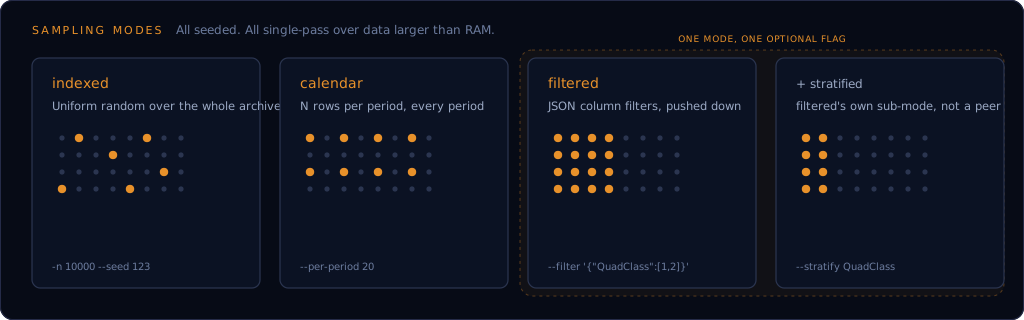
All sampling modes read from the filtered directory by default; pass --source converted to sample from raw converted Parquet instead, before the filter stage's NaN-dropping.
| Flag | Applies to | Description |
|---|---|---|
--dataset {events,events-15min,events-reduced,gkg-v1,gkg-v1-counts,gkg-v2,mentions} |
all | Which GDELT dataset to sample from (required; see --dataset above) |
--mode {indexed,filtered,calendar,daily} |
all | Sampling strategy (required). daily is a deprecated alias for calendar (period=day) |
--source {filtered,converted} |
all | Which stage's output to read from (default filtered) |
-n N |
indexed, filtered | Number of rows to sample (default 1000) |
--replace |
indexed, filtered (without --stratify) |
Sample with replacement: duplicate rows are possible, and n may exceed the total row count. Off by default; rejected for --mode calendar/daily and for --stratify |
--seed N |
all | RNG seed (default 42) |
--per-period N |
calendar | Rows per calendar period (default 10) |
--per-day N |
calendar | Deprecated alias for --per-period |
--period {day,month,year} |
calendar | Calendar period to group by (default day); rejected alongside the deprecated --mode daily |
--date-column COLUMN |
calendar | Date column to group by (default depends on --dataset: Day for events/events-15min, Date for events-reduced/gkg-v1/gkg-v1-counts, V2.1DATE for gkg-v2, MentionTimeDate for mentions) |
--filter JSON |
filtered | JSON filter dict, e.g. '{"QuadClass": [1,2]}' |
--columns COL [COL ...] |
all | Restrict output to these columns; cuts I/O and memory on the full archive |
--stratify COLUMN |
filtered | Stratify by this column; requires --n-per-group |
--n-per-group N |
filtered | Rows per stratum when --stratify is set |
--start-date YYYY-MM-DD |
all | Only sample from files whose period starts on or after this date |
--end-date YYYY-MM-DD |
all | Only sample from files whose period ends on or before this date |
--out PATH |
all | Output parquet file (default sample.parquet) |
--export-format {parquet,csv} |
all | Output file format. csv rewrites --out's extension to .csv. Off (parquet) by default |
--start-date/--end-date narrow which files each mode reads before it does anything else, the same file-level date filter scrape/convert/filter/crossref already apply (reusing filter_paths_by_date). In filtered mode this stacks with --filter's own row-level predicate pushdown rather than replacing it: the date range prunes which files even get opened, --filter then narrows rows within whatever remains. Setting both together logs a warning, since a result narrower than either constraint alone implied is otherwise easy to misread as a bug.
--export-format csv is meant for handing a finished sample to a tool that doesn't read Parquet (Excel, a quick spreadsheet look), not as a second internal storage format: CSV itself has no typed schema, so a numeric-looking string column (EventCode, EventBaseCode, EventRootCode; their zero-padded values, "020", are meaningful) reads back as a plain integer, leading zero dropped, under a standard CSV reader's own default type inference, including a bare pl.read_csv/pd.read_csv call. A <name>.csv.schema.json sidecar is written alongside the CSV recording every column's real dtype; gdeltforge.utils.io.read_csv_export(path) reads it back through that sidecar for a fully lossless round trip (confirmed against real content, including null vs. genuine-empty-string values), and is the right way to read a gdeltforge CSV export back in Python. A plain CSV reader with no sidecar to consult, or a --out file moved away from its sidecar, still hits the original limitation; a warning naming the affected columns and a manual schema_overrides fix fires at export time either way.
--columns isn't always a strict projection
Each sampling mode has its own idea of which columns it can't function without, and always keeps them in the output regardless of what --columns requests:
indexed: a true strict projection. Output is exactly the columns named in--columns, or the dataset's full declared schema if--columnsis omitted.calendar: the grouping column (--date-column, or the per-dataset default) is always kept, even if--columnsdoesn't name it.filtered/stratified: every column your--filtercondition or--stratifyreads is always kept, even if--columnsdoesn't name it.crossref's own--columnsbehaves the same way for its join key.
This is deliberate, not a bug: a mode can't group or filter by a column it silently dropped from the scan. A column --columns drops for real is anything not covered by one of those cases above.
--seed across a re-chunked archive
A rerun against the exact same files always reproduces the same sample, for every mode. Only --mode indexed also reproduces the same sample after the same logical rows get re-chunked into a different number of files; calendar and stratified sampling aren't guaranteed to at real archive scale. See Limitations for the full explanation, including a note on calendar/stratified reproducibility across the 0.10.0 upgrade specifically.
Indexed sampling (uniform random)
gdeltforge sample --dataset events --mode indexed -n 10000 --seed 123 --out sample.parquet
Samples 10,000 rows uniformly across the entire dataset.
gdeltforge sample --dataset events --mode indexed -n 10000 --replace --out bootstrap.parquet
Samples 10,000 rows with replacement: duplicates are possible, and n can exceed the dataset's total row count. This is a true simple random sample with replacement, since --mode indexed already knows the exact population size upfront; useful for a bootstrap-style draw, not just a plain SRS.
Calendar sampling (N rows per period)
gdeltforge sample --dataset events --mode calendar --per-period 20 --out daily.parquet
Samples 20 rows per day across the entire period covered by your downloaded data. The cap holds per calendar period regardless of how many files that period's rows are spread across (a historical yearly file, or GKG 2.1/Mentions' many-files-per-day cadence), unlike the deprecated daily mode's own per-file cap.
Group by month or year instead of day, and by a different dataset's own date column:
gdeltforge sample --dataset gkg-v2 --mode calendar --period month --per-period 50 --out monthly.parquet
The period count can badly exceed intuition
--period day groups strictly by the grouping column's own YYYYMMDD value, not by which file a row came from. GDELT's own event-date misdating means a single day's file can legitimately carry Day values spanning a decade (a wire report referencing a much older date, a source article with a malformed or placeholder date), so the number of distinct periods a run actually produces can be far larger than "one per file downloaded" suggests. This is a real property of the underlying data, not a bug in the grouping itself.
Equal allocation, not proportional
--per-period draws the same count from every period regardless of how many rows that period actually has. A quiet day and a busy day both contribute --per-period rows, so the pooled sample deliberately does not reproduce the archive's real day-to-day volume: an unweighted statistic computed on the output (an overall rate, a class share) is biased toward low-volume periods relative to the true archive. This is what makes calendar sampling useful for even temporal coverage; it's also why it isn't a drop-in for --mode indexed when the goal is a population-representative estimate rather than coverage. See Limitations.
Filtered sampling (JSON filters)
5,000 events whose QuadClass is in {1, 2}:
gdeltforge sample \
    --dataset events \
    --mode filtered \
    --filter '{"QuadClass": [1, 2]}' \
    -n 5000 \
    --out qc12.parquet
2,000 "Verbal Cooperation" events that happened in the USA:
gdeltforge sample \
    --dataset events \
    --mode filtered \
    --filter '{"ActionGeo_CountryCode": ["US"], "QuadClass": [1]}' \
    -n 2000
Selecting specific columns keeps memory use down:
gdeltforge sample \
    --dataset events \
    --mode filtered \
    --filter '{"ActionGeo_CountryCode": ["US"], "QuadClass": [1]}' \
    --columns GlobalEventID Year Actor1Code \
    -n 1000
Filters support nested AND/OR blocks; see the example pipelines below for an OR example across multiple columns.
--replace also works here (without --stratify): gdeltforge sample --dataset events --mode filtered --filter '{"QuadClass": [1, 2]}' -n 5000 --replace samples the filtered rows with replacement. Unlike indexed, the filtered row count isn't known upfront, so this runs a first counting pass (filter columns only, no rows materialized) before drawing n positions with replacement and streaming the filtered rows a second time to gather them; expect roughly double the I/O of the same call without --replace.
Two country-code schemes, easy to mix up
GDELT has two distinct country-code schemes: Actor1CountryCode/Actor2CountryCode use 3-letter CAMEO codes (USA), while ActionGeo_CountryCode, Actor1Geo_CountryCode, and Actor2Geo_CountryCode use 2-letter FIPS 10-4 codes (US). A value that doesn't match the right scheme for its column logs a warning rather than failing outright (FIPS 10-4 was retired in 2008 and can lag newer countries), but it also means the filter silently matches nothing. Run gdeltforge codes to check.
Stratified sampling (fixed N per group)
Combines a filter with stratified reservoir sampling: draws exactly --n-per-group rows for each distinct value of a chosen column, producing a class-balanced dataset regardless of the natural distribution.
gdeltforge sample \
    --dataset events \
    --mode filtered \
    --filter '{"ActionGeo_CountryCode": ["US"]}' \
    --stratify QuadClass \
    --n-per-group 500 \
    --out stratified.parquet
This produces 500 USA events per QuadClass value. --stratify requires --n-per-group; -n is ignored when --stratify is set.
Alongside stratified.parquet, this also writes stratified.parquet.strata.json, recording each QuadClass value's true row count in the (USA-filtered) archive, independent of --n-per-group. Calendar sampling writes the equivalent <out>.strata.json keyed by period instead. Either sidecar is the N_h a caller needs to post-stratification-reweight the equal-allocation sample back toward the population; see Filtered Sampling and Limitations. Writing it is best-effort: a failure (a read-only output directory) logs a warning rather than failing the sample.
gdeltforge crossref
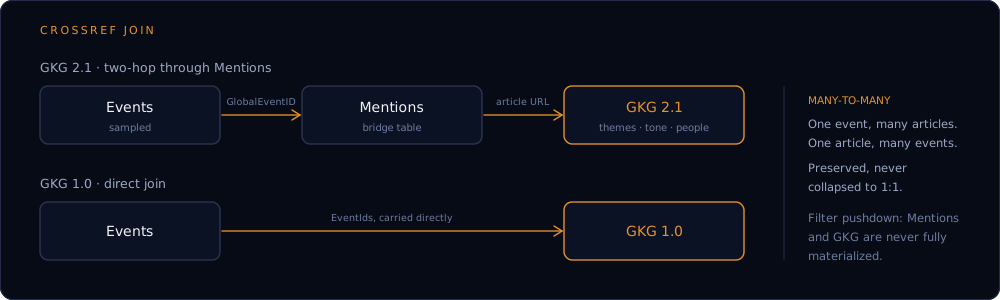
Enriches a sampled Events output with GKG: themes, tone, people, organizations extracted from the news coverage of each event. Takes a Parquet file (the output of gdeltforge sample) rather than the full archive, since joining against the entire Events dataset by default would be a much heavier operation than enriching a bounded sample.
Nothing stops --events from actually pointing at the full archive (or a directory of files) instead, since a genuinely archive-scale join is sometimes exactly what's wanted, so this isn't blocked, but it logs a warning (not a hard stop, matching how a large scrape already warns) once --events crosses 1,000,000 rows: every file in the configured Mentions/GKG directory gets scanned regardless of --events size, and just building the join key set was measured at roughly 100 MB and a second per million events (10M: ~800 MB; 50M: ~5.2 GB), before that scan even starts. If that wasn't intentional, run gdeltforge sample first.
The configured Mentions/GKG directory itself gets the same treatment, independent of --events size: past 50,000 files, a warning fires for that directory specifically (Mentions/GKG 2.1/GKG 1.0 checked separately, so either one being the large one is called out by name), since crossref lists and opens every file in it on every run, regardless of how selective the join ends up being (real measurement: ~75 microseconds/file, so ~29s for the full historical GKG 2.1/Mentions archive just to list and open, before a single row is read). --start-date/--end-date, same as scrape/convert/filter, narrow which files in that directory get listed and opened at all; pointing paths.* at a smaller, already-narrowed directory reduces it further. Both flags only narrow the Mentions/GKG side, not --events: a Mentions row is timestamped by when it was recorded, not by its event's DATEADDED (see auto's description below), so narrowing by date can exclude a legitimate late mention of an in-range event, a real scope decision rather than a risk-free filter.
gdeltforge crossref --events sample.parquet --gkg-version v2 --out enriched.parquet
| Flag | Description |
|---|---|
--events PATH |
Parquet file of Events rows to enrich (required). A directory of parquet files also works (e.g. convert/filter output directly); .done resumability markers in it are ignored |
--gkg-version {v1,v1-counts,v2,auto} |
Which GKG generation to join against (required, see below) |
--source {filtered,converted} |
Which stage's GKG/Mentions output to read from (default: filtered) |
--columns COL [COL ...] |
Restrict GKG-side output to these columns, named either the raw GKG dataset's own way (Date, Tone) or the way they actually appear in this command's output (GKG_Date, GKG_Tone); the join key column is always included regardless and is never a valid name here. Not supported with --gkg-version auto |
--on-duplicate-document {latest,earliest,all} |
When GKG 2.1 carries more than one record for the same article URL: keep all of them, one row per record (default), or narrow to just the most recent or the earliest record. Only affects v2/auto; setting it alongside v1/v1-counts logs a warning and has no effect |
--collapse-duplicate-mentions |
Collapse per-sentence duplicate mentions of the same event in the same article into one row with an explicit Mention_Count column, instead of keeping every raw Mentions row (the default). Only affects v2/auto; setting it alongside v1/v1-counts logs a warning and has no effect |
--start-date YYYY-MM-DD |
Only join against GKG/Mentions files whose period starts on or after this date. Narrows the configured directories being read, not --events |
--end-date YYYY-MM-DD |
Only join against GKG/Mentions files whose period ends on or before this date. Narrows the configured directories being read, not --events |
--out PATH |
Output parquet file (default crossref.parquet) |
--export-format {parquet,csv} |
Output file format. csv rewrites --out's extension to .csv. Off (parquet) by default; see sample's own --export-format above for the CSV round-trip caveat |
GKG's two format generations relate to Events differently, so --gkg-version picks a genuinely different join strategy, not just a different data source (see Comparison for why a direct Events<->GKG 2.1 join isn't possible):
v1andv1-counts: GKG 1.0 (and its separate Counts file) carryEventIdsdirectly on each row, a comma-delimited list, so this is a direct join. GKG 1.0 has been live and daily since 2013-04-01.v2: GKG 2.1 carries no event id at all, only the source article's URL, so this is a two-hop join through Mentions: Events -> Mentions (onGlobalEventID) -> GKG 2.1 (on that URL). GKG 2.1 and Mentions didn't exist before GDELT 2.0 launched, 2015-02-18.auto: attempts every eligible event against bothv1andv2instead of requiring one version for the whole sample, or picking exactly one per event.DATEADDEDonly decides eligibility (events before 2013-04-01 have no data in either generation and are skipped with a warning), not which single path is allowed to match: a Mentions row is timestamped by when it was created, not by its event'sDATEADDED, so an event from the GKG 1.0 era can still have a real GKG 2.1 match created much later, and GKG 1.0 remains live today, so a recent event isn't guaranteed to be GKG-2.1-only either. This is the one to reach for when a sample spans both eras, e.g. a broad historical sample that includes the 2013-2015 window where only GKG 1.0 exists. Output carries aCrossrefSourcecolumn (v1orv2) marking which path produced each row; an event that genuinely matches both contributes one row per path, not a merged or arbitrarily-chosen row. The two schemas' GKG-side columns don't overlap at all (11 GKG 1.0 fields vs 27 GKG 2.1 fields, different names throughout) and aren't unified: a row carriesNaNfor whichever set its source path didn't produce.
Both v1/v1-counts and v2 preserve the underlying many-to-many structure rather than collapsing it: one event can produce several output rows (several articles covered it, each contributing its own GKG data), and one article covering several events contributes one row per event, not one merged row. An event with no GKG match contributes no rows at all, rather than a row full of nulls. GKG-side output columns are prefixed GKG_ (and, for v2, Mentions bridge fields Mention_) to avoid colliding with an identically-named Events column, e.g. NumArticles exists on both Events and GKG 1.0.
v2's two-hop join has two further, independent sources of repeated rows for what's really the same (event, article) pair, each controlled by its own flag above, both defaulting to keeping everything rather than silently discarding anything: GKG 2.1 occasionally carries more than one record for the same document URL, all of them kept by default (--on-duplicate-document), and Mentions records one row per sentence that references an event, so an event quoted several times in one article produces several near-identical raw rows, also kept uncollapsed by default (--collapse-duplicate-mentions to fold them into one row with a Mention_Count column instead). See Crossref Join Semantics for the real-data numbers behind both.
gdeltforge sample --dataset events --mode filtered --filter '{"ActionGeo_CountryCode": ["US"]}' -n 2000 --out us_events.parquet
gdeltforge crossref --events us_events.parquet --gkg-version v2 --out us_events_enriched.parquet
Restricting GKG-side output with --columns accepts either the raw source name or the prefixed name the column actually ends up with:
gdeltforge crossref --events us_events.parquet --gkg-version v2 --columns V1THEMES GKG_V1.5TONE --out us_events_themes_tone.parquet
V1THEMES and GKG_V1.5TONE above resolve to the same underlying columns as the raw config["columns"]["gdelt_gkg_v2"] and the prefixed GKG_V1.5TONE output name would, respectively; mixing the two conventions in one --columns call is fine.
For a sample spanning the 2013-2015 window specifically (see Recipes for the full worked example):
gdeltforge sample --dataset events --mode filtered --filter '{"DATEADDED": {"op": "between", "min": 20130101, "max": 20160101}}' -n 5000 --out gap_events.parquet
gdeltforge crossref --events gap_events.parquet --gkg-version auto --out gap_events_enriched.parquet
gdeltforge codes
Looks up valid codes for GDELT's CAMEO-coded actor, geo, and event columns, so a filter value can be checked before running a sample. Needs no config file: it's a static reference lookup, usable before settings.yaml even exists.
Covers seven code families, each with its own reference list:
| Family | Columns |
|---|---|
| CAMEO actor-country (3-letter) | Actor1CountryCode, Actor2CountryCode |
| FIPS geo-country (2-letter) | ActionGeo_CountryCode, Actor1Geo_CountryCode, Actor2Geo_CountryCode |
| CAMEO ethnic | Actor1EthnicCode, Actor2EthnicCode |
| CAMEO known-group (IGOs, NGOs, and similar organizations) | Actor1KnownGroupCode, Actor2KnownGroupCode |
| CAMEO religion | Actor1Religion1Code, Actor1Religion2Code, Actor2Religion1Code, Actor2Religion2Code |
| CAMEO actor-type | Actor1Type1Code, Actor1Type2Code, Actor1Type3Code, Actor2Type1Code, Actor2Type2Code, Actor2Type3Code |
| CAMEO event (2-digit root, 3-digit base, up to 4-digit fully specified) | EventCode, EventBaseCode, EventRootCode |
FIPS 10-4 country codes are a different scheme from CAMEO's own 3-letter actor-country codes (UK not GBR, RS not RUS), so a value valid on one family can be silently wrong on another; gdeltforge codes <column> disambiguates before you run a sample.
A handful of real EventCode/EventBaseCode/EventRootCode values ("X", "--", "---") are GDELT's own markers for rows its event coder couldn't classify, not CAMEO codes, so gdeltforge codes deliberately won't list them and a filter using one will still warn.
List which columns have a reference list:
gdeltforge codes
List every code for a column:
gdeltforge codes ActionGeo_CountryCode
Search within a column by name (case-insensitive substring match):
gdeltforge codes ActionGeo_CountryCode --search korea
Look up exactly what a code means:
gdeltforge codes ActionGeo_CountryCode --search IN
  IN  India

1 code(s).
A search term that exactly matches a code (case-insensitive) is treated as
that lookup and returns only that one entry, even though the code also
happens to be a substring of several unrelated names (Indonesia,
Finland, Argentina, ...): a raw code on its own is a "what does this
mean" question, not a fuzzy search, and every code in a family is unique.
A search term that isn't itself a valid code falls back to the substring
match above.
| Flag | Description |
|---|---|
column |
Positional, optional. A CAMEO/FIPS-coded column, e.g. ActionGeo_CountryCode |
--search TERM |
An exact match (case-insensitive) against a code returns only that code; otherwise, filters results to codes or names containing this substring |
Full pipeline examples
Every one of these runs the four stages in order; only the last line differs.
Sample 10,000 rows end-to-end
gdeltforge scrape --dataset events
gdeltforge convert --dataset events
gdeltforge filter --dataset events
gdeltforge sample --dataset events --mode indexed -n 10000
Reproducible sampling (fixed seed)
gdeltforge scrape --dataset events
gdeltforge convert --dataset events
gdeltforge filter --dataset events
gdeltforge sample --dataset events --mode indexed -n 5000 --seed 42
USA-only events
gdeltforge scrape --dataset events
gdeltforge convert --dataset events
gdeltforge filter --dataset events
gdeltforge sample \
    --dataset events \
    --mode filtered \
    --filter '{"ActionGeo_CountryCode": ["US"]}' \
    -n 3000
30 events per day
gdeltforge scrape --dataset events
gdeltforge convert --dataset events
gdeltforge filter --dataset events
gdeltforge sample --dataset events --mode calendar --per-period 30
Date-restricted pipeline
scrape, convert, filter, sample, and crossref each accept --start-date/--end-date independently. scrape narrows the remote listing it discovers files from; the later stages narrow which already-on-disk files they read. Passing the same range at every stage keeps the whole pipeline focused on that window, rather than scraping a narrow range and then having convert/filter/sample process every file already sitting on disk, including ones from outside it.
gdeltforge scrape --dataset events --start-date 2020-01-01 --end-date 2023-12-31
gdeltforge convert --dataset events --start-date 2020-01-01 --end-date 2023-12-31
gdeltforge filter --dataset events --start-date 2020-01-01 --end-date 2023-12-31
gdeltforge sample --dataset events --mode indexed -n 10000 --start-date 2020-01-01 --end-date 2023-12-31
Bash one-liner
gdeltforge scrape --dataset events && \
gdeltforge convert --dataset events && \
gdeltforge filter --dataset events && \
gdeltforge sample --dataset events --mode indexed -n 10000
PowerShell loop
foreach ($c in "scrape", "convert", "filter") {
    gdeltforge $c --dataset events
}
gdeltforge sample --dataset events --mode indexed -n 10000
For the complete filter syntax (nested AND/OR blocks, all operators) see Filtered Sampling; for complete runnable examples see Recipes.